Sitemap Generator
Create XML, Image, Hreflang, HTML, and Visual sitemaps for your website instantly. Optimize your site for search engine discovery.
Enter a URL above to start generating your sitemap
Pro Tip: Submitting to Google
Once you download your sitemap, upload it to your website's root folder and submit the URL to Google Search Console to speed up indexing.
- Instant results
- We never store your data
- Free, no sign-up
How to use the Sitemap Generator in 4 steps
Our free online Sitemap Generator gets the job done in seconds, with no software to install.
- Step 1
Enter a URL
Type the website or page address you want the Sitemap Generator to check.
- Step 2
Click Generate
Start the scan. The tool fetches the page and analyses it for you.
- Step 3
Review the report
Go through the results, highlighted issues and recommendations.
- Step 4
Fix and export
Apply the fixes on your site, then copy or download the results.
Complete Website Sitemap Creation Suite
The Sitemap Generator tool is a comprehensive suite for website owners, developers, and SEO professionals. It enables you to create five distinct types of maps: XML, Image, Hreflang, HTML, and Visual.
By providing a clear roadmap to search engines, you ensure that every page is crawled and indexed efficiently. This is especially important after generating fresh pages with our AI Content Writer.
Our crawler scans your architecture and identifies link structures that might need optimization. Combine this data with our SEO Checker for a deep dive into your site's discoverability.
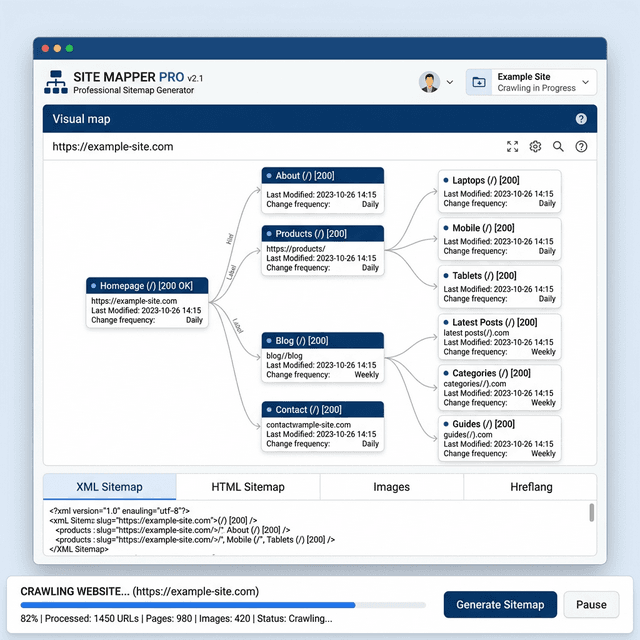
Five Specialized Sitemap Formats
XML Sitemaps
The standard format for Google, Bing, and other search engines to discover your content.
Image Sitemaps
Boost your visibility in Image Search by helping crawlers find all your media assets.
HTML & Visual
Improve user navigation and visualize your site structure with ease.
Maximizing Indexing Efficiency
Regularly generating and submitting sitemaps is a cornerstone of professional search engine optimization. It reduces the time it takes for new updates to appear in search results. After using our FAQ Schema Generator, make sure to regenerate your sitemap to include the updated schema-rich pages.
For large websites, keeping track of page counts is critical. Use our Word Counter to ensure your indexed pages meet quality standards, and perform a full SEO Audit quarterly to ensure your sitemap stays error-free.
Frequently Asked Questions
Is the Sitemap Generator free?
Yes. You can generate sitemaps for free with no sign-up.
Which sitemap types can I create?
You can create XML, Image, Hreflang, HTML and Visual sitemaps from a single crawl of your website.
How do I submit my sitemap to Google?
Upload the XML file to your site, then add its URL in Google Search Console under Sitemaps. You can also reference it in robots.txt.
Why are some pages missing from my sitemap?
The crawler can only find pages that are linked from your site and publicly accessible. Pages blocked by robots.txt or behind a login are skipped.
How often should I regenerate my sitemap?
Regenerate it whenever you add, remove or rename pages, or at least every few months on an active site.
What is an hreflang sitemap?
It lists the language and regional versions of each page so search engines can show visitors the right version.
You might also like
SEO Audit
A deep-dive technical audit of your domain to find hidden crawling and indexing issues.
SEO Checker
Check titles, meta tags, headings, and on-page signals with actionable recommendations.
Keyword Rank Checker
Monitor where your website sits in Google search for specific high-value keywords.
FAQ Schema Generator
Create valid JSON-LD schema for your FAQ sections to improve Google Search rich results.
One place for all your everyday web tools
Writing, SEO, images and code: 18+ free tools that work in your browser. No installs, no clutter.